> ## Documentation Index
> Fetch the complete documentation index at: https://cometchat-22654f5b-docs-agent-native-development.mintlify.site/llms.txt
> Use this file to discover all available pages before exploring further.
# Call Logs
> Display CometChat React UI Kit call logs with call type, duration, participants, timestamps, request builders, and selection callbacks.
```json theme={null}
{
"component": "CometChatCallLogs",
"package": "@cometchat/chat-uikit-react",
"import": "import { CometChatCallLogs } from \"@cometchat/chat-uikit-react\";",
"cssImport": "import \"@cometchat/chat-uikit-react/css-variables.css\";",
"description": "Scrollable list of call history entries with filtering, call-back actions, and custom views.",
"cssRootClass": ".cometchat-call-logs",
"primaryOutput": {
"prop": "onItemClick",
"type": "(call: any) => void"
},
"props": {
"data": {
"callLogRequestBuilder": {
"type": "any (CallLogRequestBuilder)",
"default": "SDK default (30 per page)"
},
"activeCall": {
"type": "any",
"default": "undefined"
},
"callInitiatedDateTimeFormat": {
"type": "CalendarObject",
"default": "DD MMM, hh:mm A"
}
},
"callbacks": {
"onItemClick": "(call: any) => void",
"onCallButtonClicked": "(call: any) => void",
"onError": "((error: CometChat.CometChatException) => void) | null"
},
"visibility": {
"showScrollbar": { "type": "boolean", "default": false }
},
"viewSlots": {
"itemView": "(call: any) => JSX.Element",
"leadingView": "(call: any) => JSX.Element",
"titleView": "(call: any) => JSX.Element",
"subtitleView": "(call: any) => JSX.Element",
"trailingView": "(call: any) => JSX.Element",
"loadingView": "JSX.Element",
"emptyView": "JSX.Element",
"errorView": "JSX.Element"
}
},
"events": [
{
"name": "CometChatMessageEvents.ccMessageSent",
"payload": "IMessages",
"description": "Call message sent"
}
],
"types": {
"CalendarObject": {
"today": "string | undefined",
"yesterday": "string | undefined",
"lastWeek": "string | undefined",
"otherDays": "string | undefined"
}
}
}
```
## Where It Fits
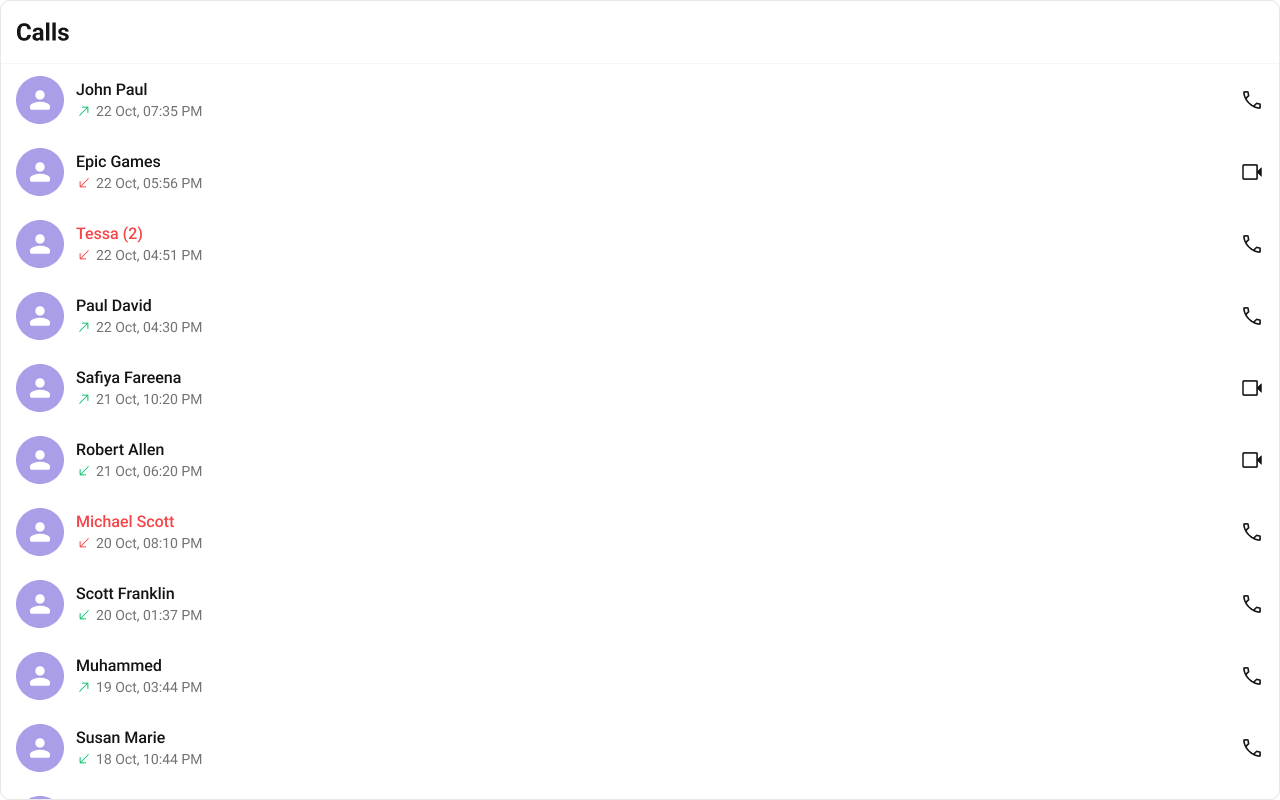
`CometChatCallLogs` is a standalone list component that renders call history entries. Each entry shows the caller/callee, call type (audio/video), direction (incoming/outgoing/missed), and timestamp. The `onItemClick` callback emits the selected call log, and `onCallButtonClicked` fires when the call-back button is tapped.
```tsx lines theme={null}
import { CometChatCallLogs } from "@cometchat/chat-uikit-react";
import "@cometchat/chat-uikit-react/css-variables.css";
function CallLogPanel() {
return (
{
console.log("Call log selected:", callLog);
}}
onCallButtonClicked={(callLog: any) => {
console.log("Call back:", callLog);
}}
/>
);
}
```
 ***
## Minimal Render
```tsx lines theme={null}
import { CometChatCallLogs } from "@cometchat/chat-uikit-react";
import "@cometchat/chat-uikit-react/css-variables.css";
function CallLogsDemo() {
return (
***
## Minimal Render
```tsx lines theme={null}
import { CometChatCallLogs } from "@cometchat/chat-uikit-react";
import "@cometchat/chat-uikit-react/css-variables.css";
function CallLogsDemo() {
return (
);
}
export default CallLogsDemo;
```
Root CSS class: `.cometchat-call-logs`
***
## Filtering Call Logs
Pass a `CallLogRequestBuilder` from `@cometchat/calls-sdk-javascript` to `callLogRequestBuilder`.
```tsx lines theme={null}
import { CallLogRequestBuilder } from "@cometchat/calls-sdk-javascript";
import { CometChatCallLogs } from "@cometchat/chat-uikit-react";
function FilteredCallLogs() {
return (
);
}
```
### Filter Recipes
| Recipe | Code |
| - | - |
| Limit to 5 per page | `new CallLogRequestBuilder().setAuthToken(token).setLimit(5)` |
| Cancelled calls only | `new CallLogRequestBuilder().setAuthToken(token).setCallStatus("cancelled")` |
| Video calls only | `new CallLogRequestBuilder().setAuthToken(token).setCallType("video")` |
| Calls with recordings | `new CallLogRequestBuilder().setAuthToken(token).setHasRecording(true)` |
| Calls for a specific user | `new CallLogRequestBuilder().setAuthToken(token).setUid("user_uid")` |
| Calls for a specific group | `new CallLogRequestBuilder().setAuthToken(token).setGuid("group_guid")` |
Refer to [CallLogRequestBuilder](/sdk/javascript/call-logs) for the full builder API.
***
## Actions and Events
### Callback Props
#### onItemClick
Fires when a call log entry is tapped.
```tsx lines theme={null}
import { CometChatCallLogs } from "@cometchat/chat-uikit-react";
function CallLogsWithClick() {
return (
{
console.log("Selected call log:", callLog);
}}
/>
);
}
```
#### onCallButtonClicked
Fires when the call-back button in the trailing view is tapped.
```tsx lines theme={null}
import { CometChatCallLogs } from "@cometchat/chat-uikit-react";
function CallLogsWithCallback() {
return (
{
console.log("Call back:", callLog);
}}
/>
);
}
```
#### onError
Fires on internal errors (network failure, auth issue, SDK exception).
```tsx lines theme={null}
import { CometChatCallLogs } from "@cometchat/chat-uikit-react";
import { CometChat } from "@cometchat/chat-sdk-javascript";
function CallLogsWithError() {
return (
{
console.error("CometChatCallLogs error:", error);
}}
/>
);
}
```
### Global UI Events
The component subscribes to `CometChatMessageEvents.ccMessageSent` to detect when a call message is sent and refresh the list.
### SDK Events (Real-Time, Automatic)
The component listens to SDK call events internally for real-time updates. No manual attachment needed.
In React 18 StrictMode, `useEffect` runs twice on mount in development. The component handles listener cleanup internally.
***
## Custom View Slots
Each slot replaces a section of the default UI. Slots that accept a call log parameter receive the call log object for that row.
| Slot | Signature | Replaces |
| - | - | - |
| `itemView` | `(call: any) => JSX.Element` | Entire list item row |
| `leadingView` | `(call: any) => JSX.Element` | Avatar / left section |
| `titleView` | `(call: any) => JSX.Element` | Name / title text |
| `subtitleView` | `(call: any) => JSX.Element` | Call type, direction, timestamp |
| `trailingView` | `(call: any) => JSX.Element` | Call-back button area |
| `loadingView` | `JSX.Element` | Loading spinner |
| `emptyView` | `JSX.Element` | Empty state |
| `errorView` | `JSX.Element` | Error state |
### itemView
Replace the entire call log list item.
```tsx lines theme={null}
import { CometChatCallLogs } from "@cometchat/chat-uikit-react";
function CustomItemViewCallLogs() {
const getItemView = (callLog: any) => {
return (
{callLog?.getInitiator()?.getName()}
{callLog?.getStatus()}
);
};
return ;
}
```
```css lines theme={null}
.custom-call-log-item {
display: flex;
align-items: center;
justify-content: space-between;
padding: 8px 16px;
border-bottom: 1px solid var(--cometchat-border-color-light);
}
.custom-call-log-item__name {
font: var(--cometchat-font-heading4-medium);
color: var(--cometchat-text-color-primary);
}
.custom-call-log-item__status {
font: var(--cometchat-font-body-regular);
color: var(--cometchat-text-color-secondary);
}
```
### subtitleView
Replace the subtitle text (call type, duration).
```tsx lines theme={null}
import { CometChatCallLogs } from "@cometchat/chat-uikit-react";
function SubtitleCallLogs() {
const getSubtitleView = (callLog: any) => {
return (
{callLog?.getStatus()} • {callLog?.getType()}
);
};
return ;
}
```
```css lines theme={null}
.custom-call-log-subtitle {
font: var(--cometchat-font-body-regular);
color: var(--cometchat-text-color-secondary);
}
```
### trailingView
Replace the right section (call-back button area).
```tsx lines theme={null}
import { CometChatCallLogs } from "@cometchat/chat-uikit-react";
function TrailingViewCallLogs() {
const getTrailingView = (callLog: any) => {
return (
);
};
return ;
}
```
```css lines theme={null}
.custom-call-log-trailing button {
background: var(--cometchat-primary-color);
color: var(--cometchat-static-white);
border: none;
border-radius: var(--cometchat-radius-2);
padding: 4px 12px;
cursor: pointer;
}
```
### callInitiatedDateTimeFormat
Customize the call initiated timestamp format using a `CalendarObject`.
```tsx lines theme={null}
import {
CometChatCallLogs,
CalendarObject,
} from "@cometchat/chat-uikit-react";
function CustomDateCallLogs() {
const dateFormat = new CalendarObject({
today: "hh:mm A",
yesterday: "[yesterday]",
otherDays: "DD MM YYYY",
});
return ;
}
```
If no property is passed in the [CalendarObject](/ui-kit/react/v6/localize#calendarobject), the component checks the [global configuration](/ui-kit/react/v6/localize#customisation) first. If also missing there, the component's default formatting applies.
***
## Common Patterns
### Custom empty state
```tsx lines theme={null}
import { CometChatCallLogs } from "@cometchat/chat-uikit-react";
function EmptyStateCallLogs() {
return (
No call history
}
/>
);
}
```
### Filtered to video calls only
```tsx lines theme={null}
import { CallLogRequestBuilder } from "@cometchat/calls-sdk-javascript";
import { CometChatCallLogs } from "@cometchat/chat-uikit-react";
function VideoCallLogs({ authToken }: { authToken: string }) {
return (
);
}
```
***
## CSS Architecture
The component uses CSS custom properties (design tokens) defined in `@cometchat/chat-uikit-react/css-variables.css`. The cascade:
1. Global tokens are set on the `.cometchat` root wrapper.
2. Component CSS (`.cometchat-call-logs`) consumes these tokens via `var()` with fallback values.
3. Overrides target `.cometchat-call-logs` descendant selectors in a global stylesheet.
### Key Selectors
| Target | Selector |
| - | - |
| Root | `.cometchat-call-logs` |
| List item | `.cometchat-call-logs .cometchat-list-item` |
| Active item | `.cometchat-call-logs__list-item-active .cometchat-list-item` |
| Trailing view (video) | `.cometchat-call-logs__list-item-trailing-view-video` |
| Trailing view (audio) | `.cometchat-call-logs__list-item-trailing-view-audio` |
| Subtitle | `.cometchat-call-logs__list-item-subtitle` |
| Subtitle date | `.cometchat-call-logs__list-item-subtitle .cometchat-date` |
| Missed call icon | `.cometchat-call-logs__list-item-subtitle-icon-missed-call` |
| Outgoing call icon | `.cometchat-call-logs__list-item-subtitle-icon-outgoing-call` |
| Incoming call icon | `.cometchat-call-logs__list-item-subtitle-icon-incoming-call` |
| Empty state | `.cometchat-call-logs__empty-state-view` |
| Error state | `.cometchat-call-logs__error-state-view` |
| Shimmer loading | `.cometchat-call-logs__shimmer` |
| Outgoing call overlay | `.cometchat-call-logs__outgoing-call` |
### Customization Matrix
| What to change | Where | Property/API | Example |
| - | - | - | - |
| Override behavior on user interaction | Component props | `on` callbacks | `onItemClick={(c) => showDetails(c)}` |
| Filter which call logs appear | Component props | `callLogRequestBuilder` | `callLogRequestBuilder={new CallLogRequestBuilder().setLimit(5)}` |
| Replace a section of the list item | Component props | `View` render props | `subtitleView={(c) => {c.getStatus()}
}` |
| Change colors, fonts, spacing | Global CSS | Target `.cometchat-call-logs` class | `.cometchat-call-logs .cometchat-list-item { background: #f9f8fd; }` |
***
## Props
All props are optional.
***
### activeCall
Highlights the currently active/selected call log entry.
| | |
| - | - |
| Type | `any` |
| Default | `undefined` |
***
### callInitiatedDateTimeFormat
Format for displaying the call initiated timestamp.
| | |
| - | - |
| Type | `CalendarObject` |
| Default | Component default (`DD MMM, hh:mm A`) |
Falls back to [global calendar configuration](/ui-kit/react/v6/localize#customisation) if not set.
***
### callLogRequestBuilder
Controls which call logs load and in what order.
| | |
| - | - |
| Type | `any` (CallLogRequestBuilder from `@cometchat/calls-sdk-javascript`) |
| Default | SDK default (30 per page) |
***
### emptyView
Custom component displayed when there are no call logs.
| | |
| - | - |
| Type | `JSX.Element` |
| Default | Built-in empty state |
***
### errorView
Custom component displayed when an error occurs.
| | |
| - | - |
| Type | `JSX.Element` |
| Default | Built-in error state |
***
### itemView
Custom renderer for the entire call log list item.
| | |
| - | - |
| Type | `(call: any) => JSX.Element` |
| Default | Built-in list item |
***
### leadingView
Custom renderer for the avatar / left section.
| | |
| - | - |
| Type | `(call: any) => JSX.Element` |
| Default | Built-in avatar |
***
### loadingView
Custom component displayed during the loading state.
| | |
| - | - |
| Type | `JSX.Element` |
| Default | Built-in shimmer |
***
### onCallButtonClicked
Callback fired when the call-back button is clicked.
| | |
| - | - |
| Type | `(call: any) => void` |
| Default | `undefined` |
***
### onError
Callback fired when the component encounters an error.
| | |
| - | - |
| Type | `((error: CometChat.CometChatException) => void) \| null` |
| Default | `undefined` |
***
### onItemClick
Callback fired when a call log entry is clicked.
| | |
| - | - |
| Type | `(call: any) => void` |
| Default | `undefined` |
***
### showScrollbar
Shows the scrollbar in the call log list.
| | |
| - | - |
| Type | `boolean` |
| Default | `false` |
***
### subtitleView
Custom renderer for the subtitle text.
| | |
| - | - |
| Type | `(call: any) => JSX.Element` |
| Default | Built-in subtitle |
***
### titleView
Custom renderer for the name / title text.
| | |
| - | - |
| Type | `(call: any) => JSX.Element` |
| Default | Built-in title |
***
### trailingView
Custom renderer for the right section.
| | |
| - | - |
| Type | `(call: any) => JSX.Element` |
| Default | Built-in trailing view |
***
## Events
| Event | Payload | Fires when |
| - | - | - |
| `CometChatMessageEvents.ccMessageSent` | `IMessages` | Call message sent |
***
## CSS Selectors
| Target | Selector |
| - | - |
| Root | `.cometchat-call-logs` |
| List item | `.cometchat-call-logs .cometchat-list-item` |
| Active item | `.cometchat-call-logs__list-item-active .cometchat-list-item` |
| Trailing view (video) | `.cometchat-call-logs__list-item-trailing-view-video` |
| Trailing view (audio) | `.cometchat-call-logs__list-item-trailing-view-audio` |
| Subtitle | `.cometchat-call-logs__list-item-subtitle` |
| Subtitle date | `.cometchat-call-logs__list-item-subtitle .cometchat-date` |
| Missed call icon | `.cometchat-call-logs__list-item-subtitle-icon-missed-call` |
| Outgoing call icon | `.cometchat-call-logs__list-item-subtitle-icon-outgoing-call` |
| Incoming call icon | `.cometchat-call-logs__list-item-subtitle-icon-incoming-call` |
| Empty state | `.cometchat-call-logs__empty-state-view` |
| Error state | `.cometchat-call-logs__error-state-view` |
| Shimmer loading | `.cometchat-call-logs__shimmer` |
| Outgoing call overlay | `.cometchat-call-logs__outgoing-call` |
This documentation is built and hosted on [Mintlify](https://mintlify.com), a developer documentation platform.